
info@PresentationPoint.com
  • Facebook
  • Twitter
  • RSS
  • YouTube
  • LinkedIn
  • Facebook
  • Twitter
  • RSS
  • YouTube
  • LinkedIn
  • Reviews
  • Support
  • Resellers
  • Media kit
  • My Account
  • Contact
  • Sites
    • INSYNCR
    • ConnectedCompany.app
    • SignageTube.com
    • SplitFlapTV.com
0 Items
PresentationPoint
  • Solutions
    • Automated Reporting
    • Corporate Communication
    • Event Digital Calendars
    • Live Data Presentations
    • KPI Dashboards
    • Restaurant Digital Signage
    • Waiting Room Signage
    • Custom Data Services
  • Software
    • DataPoint
    • SignageTube
    • iPoint
    • ConnectedCompany
  • Case Studies
    • Index
    • Attractions and Events
    • Digital Signage Solutions
    • Financial
    • Food and Beverage
    • Healthcare
    • Marketing and Advertising
    • Retail
  • Blog
  • Resources
  • About
Select Page
Link Text files and CSV data in PowerPoint

Link Text files and CSV data in PowerPoint

May 30, 2016 | DataPoint, DataPoint Automation

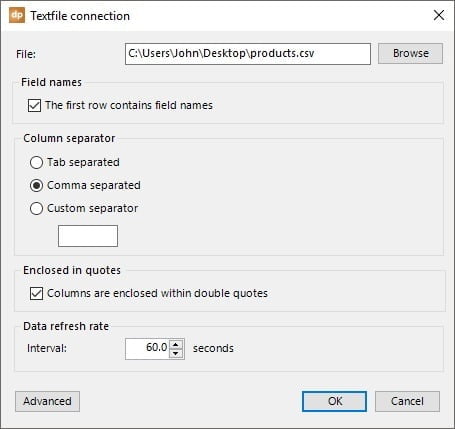
Text and CSV files are databases in the most simplest form. You don’t need a specific database server software. You just store the data in a text file. Unencrypted, unprotected, no compression and no intelligent indexing system on it. In most cases, a text file...
Using DataPoint Shortcuts to Make Faster Dynamic Presentations

Using DataPoint Shortcuts to Make Faster Dynamic Presentations

May 23, 2016 | DataPoint, How-To

There are some handy shortcuts in DataPoint to do things much quicker. Let us illustrate this with some sample data like addresses. We have our raw address information stored in Excel like this: Then we use DataPoint to set up a connection to that Excel and we will...

KPI Dashboard: Lundins Case Study

KPI Dashboard: Lundins Case Study

May 18, 2016 | Articles, Case Studies, Data Dashboards, DataPoint, DataPoint Automation, How-To, Industrial/Manufacturing, Reporting

Our clients are extremely creative and come up with ways to use our products that often astonish us. So we thought we would share some case studies as to how our clients make real-life use of our software tools within their businesses or organization. Today, we are...

Display real-time Data in PowerPoint

Display real-time Data in PowerPoint

May 10, 2016 | DataPoint, DataPoint Real-time Screens, How-To

OData or Open Data Protocol, allows you to connect to RESTful APIs in a simple and standard way.  Typically you will find an oData service with one or more resources with data. DataPoint allows you to connect to an oData service (and more). You can use DataPoint to...

BI Reporting Tools: PowerPoint

BI Reporting Tools: PowerPoint

May 3, 2016 | Articles, DataPoint, DataPoint Automation, Financial, Marketing and Advertising

When you think of Business Intelligence (BI) reporting tools, PowerPoint might not come to mind. Here are some great reasons why PowerPoint deserves to be in your kit of BI reporting tools. Ease of Use Data Connections Dashboarding Total Customization Add-Ons Ease of...

Search

Categories

  • Articles
  • Attractions and Events
  • Aviation
  • Broadcasting
  • Case Studies
  • CounterPoint
  • Data Dashboards
  • DataPoint
  • DataPoint Automation
  • DataPoint Real-time Screens
  • Digital Signage
  • Dynamic elements
  • Education
  • Elections
  • Evergreen
  • FAQ
  • Financial
  • Food & Beverage
  • Government
  • Healthcare
  • Hotel
  • How-To
  • Human Resources
  • Industrial/Manufacturing
  • Interoffice Communication
  • iPoint
  • Logistics
  • Makeovers
  • Maps
  • Marketing and Advertising
  • Merge
  • MessagePoint
  • Military or Defense
  • Non-profit
  • QR Codes
  • Real Estate
  • Reporting
  • Retail
  • Scoreboards
  • Service reports
  • SignageTube
  • TickerPoint
  • Transportation
  • Tutorials
  • VideoPoint
  • Wayfinding
  • Weather

Recent Posts

  • Beyond Numbers: Telling Your Business Story with Compelling KPI Dashboards
  • Real-Time Scoreboards in PowerPoint: Boost Engagement with DataPoint Integration
  • Mastering Data Presentation: The Synergy of PowerPoint and DataPoint
  • Automated Data Reporting: Saving Time and Reducing Errors
  • How to Save Time Copying and Pasting Digital Information onto PowerPoint Presentations and Reports
  • Streamline Your Presentations: Creating Dynamic Dashboards with DataPoint in PowerPoint
  • From Hours to Minutes: DataPoint’s Game-Changing Approach to Automated Financial Reporting
  • Unlock Real-Time Insights: The Power of Live Dashboards for Your Business
  • Transform Your Presentations: Harness Live Data with DataPoint
  • From Slides to Documents: How DataPoint Transforms PowerPoint into a Document Maker
  • From Spreadsheets to Spectacle: Create Stunning Database Dashboards
  • Real-Time information for Police Air Support Team
  • The Future of Menus: How Surge Pricing Can Boost Your Restaurant’s Revenue
  • The Future of Documentation: Exploring Automated Document Makers
  • Data Storytelling: The Secret Weapon for Impactful Business Reports
  • Work Smart: Automatically Update PowerPoint Slide Notes with DataPoint
  • Why Smart Businesses Are Switching to Automated Reporting (And You Should Too)
  • Use DataPoint’s Real-Time Dashboards Capability to Unlock the Power of Live Data
  • Stop The Madness of Copy and Paste Data for PowerPoint Presentations and Reports
  • The Revolution of Business Communication: Embracing Digital Signage Over Traditional Paper Displays

Archives

  • December 2024
  • November 2024
  • October 2024
  • September 2024
  • August 2024
  • July 2024
  • June 2024
  • May 2024
  • April 2024
  • February 2024
  • January 2024
  • December 2023
  • November 2023
  • October 2023
  • September 2023
  • August 2023
  • July 2023
  • June 2023
  • May 2023
  • April 2023
  • March 2023
  • January 2023
  • November 2022
  • October 2022
  • September 2022
  • July 2022
  • June 2022
  • May 2022
  • April 2022
  • March 2022
  • February 2022
  • January 2022
  • December 2021
  • November 2021
  • October 2021
  • September 2021
  • August 2021
  • July 2021
  • June 2021
  • May 2021
  • April 2021
  • March 2021
  • February 2021
  • January 2021
  • December 2020
  • November 2020
  • October 2020
  • September 2020
  • August 2020
  • July 2020
  • June 2020
  • May 2020
  • April 2020
  • March 2020
  • February 2020
  • January 2020
  • December 2019
  • November 2019
  • October 2019
  • September 2019
  • August 2019
  • July 2019
  • June 2019
  • May 2019
  • April 2019
  • March 2019
  • February 2019
  • January 2019
  • December 2018
  • November 2018
  • October 2018
  • September 2018
  • August 2018
  • July 2018
  • June 2018
  • May 2018
  • April 2018
  • March 2018
  • February 2018
  • January 2018
  • December 2017
  • November 2017
  • October 2017
  • September 2017
  • August 2017
  • July 2017
  • June 2017
  • May 2017
  • April 2017
  • March 2017
  • February 2017
  • January 2017
  • December 2016
  • November 2016
  • October 2016
  • September 2016
  • August 2016
  • July 2016
  • June 2016
  • May 2016
  • April 2016
  • March 2016
  • February 2016
  • January 2016
  • December 2015
  • November 2015
  • October 2015
  • September 2015
  • August 2015
  • July 2015
  • June 2015
  • May 2015
  • April 2015
  • March 2015
  • February 2015
  • January 2015
  • December 2014
  • November 2014
  • October 2014
  • September 2014
  • May 2014
  • April 2014
  • March 2014
Celebrating 25 years of PresentationPoint

Subscribe To Our Newsletter

Join our mailing list to receive the latest news and updates from our team.

You can unsubscribe anytime. For more details, review our Privacy Policy.

Thank you!

You have successfully joined our subscriber list.

.

Recent Posts

  • Beyond Numbers: Telling Your Business Story with Compelling KPI Dashboards
  • Real-Time Scoreboards in PowerPoint: Boost Engagement with DataPoint Integration
  • Mastering Data Presentation: The Synergy of PowerPoint and DataPoint
  • Automated Data Reporting: Saving Time and Reducing Errors
  • How to Save Time Copying and Pasting Digital Information onto PowerPoint Presentations and Reports
  • Streamline Your Presentations: Creating Dynamic Dashboards with DataPoint in PowerPoint
  • From Hours to Minutes: DataPoint’s Game-Changing Approach to Automated Financial Reporting
  • Unlock Real-Time Insights: The Power of Live Dashboards for Your Business
  • Transform Your Presentations: Harness Live Data with DataPoint
  • From Slides to Documents: How DataPoint Transforms PowerPoint into a Document Maker

Follow Us

  • Facebook
  • YouTube
  • LinkedIn

Copyright Notice

BreakPoint, ConnectedCompany, CounterPoint, DataPoint, Dynamic ELEMENTS, iPoint, MessagePoint, NewsPoint, Numberish, OutlookPoint, PlanPoint, ShowPoint, SignageTube, Split-Flap TV, TickerPoint and VideoPoint are trademarks or registered trademarks of PresentationPoint. Microsoft and the Office logo are trademarks or registered trademarks of Microsoft Corporation in the United States and/or other countries.
  • Sitemap
  • Terms and Conditions
  • Privacy Policy
  • Facebook
  • Twitter
  • RSS
  • YouTube
  • LinkedIn

INSYNCR

We’ve Evolved Into Something Bigger

PresentationPoint has been acquired by INSYNCR, and we’re now powering next-generation solutions across multiple platforms. Your trusted partner has grown stronger, and we’re here to serve you better than ever.

INSYNCR

Automated reporting and data visualization solutions

SignageTube

Real-time digital signage solutions and display management

Split-Flap TV

Concept-specific digital signage solutions and display management

We are using cookies to give you the best experience on our website.

You can find out more about which cookies we are using or switch them off in .

PresentationPoint
Powered by  GDPR Cookie Compliance
Privacy Overview

This website uses cookies so that we can provide you with the best user experience possible. Cookie information is stored in your browser and performs functions such as recognising you when you return to our website and helping our team to understand which sections of the website you find most interesting and useful.

Strictly Necessary Cookies

Strictly Necessary Cookie should be enabled at all times so that we can save your preferences for cookie settings.